

Chaos Day Playbook
Who is this playbook for?
The Equal Experts Chaos Day Playbook is a distillation of our thinking on how best to run a Chaos Day.
It draws from our experience of running many Chaos Days across a diverse set of clients, including retail organisations and major public-sector departments.
We’ve created this playbook to help teams and organisations design, plan, execute and review a Chaos Day. It’s not just for engineers; it is for everyone involved in delivering software. Product owners can learn more about the risks and impacts of failure, testers can learn how to explore edge cases and test for resilience and designers can benefit from a greater understanding of the user experience of failure and how to design interfaces that are adaptable.
This playbook is for any organisation, regardless of their tech stack or maturity. You don’t have to use containers, Kubernetes, or be in AWS, GCP, Azure or any other cloud platform to gain the benefits of probing your system’s response to failure.
For readers who are pressed for time and already familiar with basic chaos engineering concepts, jump to the 5-minute guide to running a Chaos Day, and a case study on condensing the entire process into a 2.5-hour mini chaos event. For those who want more depth, read on.
We have open-sourced this under a Creative Commons license and encourage contributions to iteratively improve our content.
Why Chaos?
Chaos Days are a practice within the field of Chaos engineering, which is defined as:
“The discipline of experimenting on a system in order to build confidence in the system’s capability to withstand turbulent conditions in production.”
Modern systems consist of a high number of complex components, with equally complex connections between them. Defects are always present, and failures will occur. For an IT system, turbulence comes in many forms, ranging from single-point to multiple, unrelated failures, often combined with sudden changes in external pressure (e.g. traffic spikes).
The complexity of IT systems makes it impossible to predict how they will respond to this turbulence. One such example was a Google Cloud Outage that led to reports of people being unable to operate their home air-conditioning. The trigger was the combined impact of three separate, unrelated bugs, which severely impacted the Google Cloud US network for several hours.
Chaos Days allow teams to safely explore these turbulent conditions by designing and running controlled experiments in pre-production or production environments. Each experiment injects a failure into the system (e.g. terminate a compute instance, fill up a storage device) in order to analyse the impact and system response.
What benefits do Chaos Days provide?
An IT system includes the people who develop and operate it and the knowledge, experience, tools and processes they use to respond to incidents. As John Allspaw puts it:
“People are the adaptable element of complex systems.”
The analysis of a team’s response to incidents provides many lessons that can lead to improved system resilience. The Oxford Dictionary defines resilience as:
- The capacity to recover quickly from difficulties.
- The ability of a substance or object to spring back into shape; elasticity.
Some learning may be technical, such as implementing retry mechanisms and circuit breakers; other types of learning include the processes a team uses to detect, triage and resolve an incident (such as communication channels, escalation routes, runbooks, etc.).
A key but often underestimated benefit is the sharing of internal knowledge that individual team members rely on when working through an incident. By spreading this knowledge across the team, resilience is improved just through people’s greater cognisance of system behaviour and failure scenarios when tackling production incidents or developing system enhancements.
Chaos Days improve system resilience by developing key elements.
People
By giving them new:
- Knowledge about system behaviour.
- Expertise in diagnosing and resolving incidents.
- Skills and behaviours in collaborating, communicating and thinking during high-stress periods.
- Understanding of how ownership and operability impact system recovery.
Processes
Through guiding improvements in:
- Incident management (such as communication channels, team roles or timeline documentation).
- Incident analysis (e.g. improving how post-incident reviews are conducted).
- Engineering approach (e.g. feature requirements including how faults should be handled and how resilience testing is performed during feature development).
Products/toolsets
By initiating changes that:
- Make services more resilient (e.g. implementing retries when a downstream fails).
- Make services and dependencies simpler and easier to reason about, which is important when under pressure.
- Improve observability so that engineers can isolate failures and fix them faster.
- Improve documentation, such as more informative exception messages and runbook documentation.
Introduction
This section is a bare-bones version of the what and how of running a Chaos Day. The rest of the playbook expands each step, covering the key outcomes, common problems and examples of application.
The steps for running a Chaos Day are:
- Plan who, what, when, where.
- Execute the experiments.
- Review execution, impact, response and chaos mechanics.
- Share knowledge gained.
Chaos planning
- Start small: involve one or two teams, not the entire engineering group.
- Identify a few of the most experienced engineers across those teams. These people will be the agents of chaos, and will design and execute the experiments.
- At least two weeks before Chaos Day, arrange a planning session with the whole team. As Norah Jones describes in Chaos Engineering Trap 2, it is important to have everyone involved at this stage to maximise the learning across the team. Draw the system architecture on a whiteboard (or remote equivalent), then use sticky notes and/or a Trello board to brainstorm possible experiments that simulate a failure that your system should tolerate. Don’t focus on failures that you have no control over, such as an outage within your cloud provider, as they have low learning value.
- With the brainstorming complete, to provide the most surprise on the Chaos Day itself, reduce the group to just the agents of chaos. They can then consider, for each experiment:
- Failure mode (e.g. partial connectivity loss, an instance being terminated, network slowdown).
- Expected impact in both technical and business terms (e.g. dependent services fail, or in-progress customer transactions are halted).
- Anticipated response (e.g. the service auto-heals, an alert is fired, or nobody notices).
- If the failure remains unresolved, how would the injected fault be rolled back?
- Should the experiment be run in isolation (e.g. would a degradation in monitoring limit learning from other experiments)?
- Which environment will it be run on? Our experience suggests that using the same pre-production environment for all experiments makes execution easier, providing valuable learning, without production’s costs and risks.
- Shortlist 4–8 experiments based on business risk and learning opportunity (e.g. what failure mode would have the greatest risk to the business and a system response that you’re uncertain about?).
- Prepare the experiments (hence, the two-week gap between planning and the main event), keeping them secret from the participating teams to maximise the realism of unexpected failures.
- Determine a date for Chaos Day, check that it won’t impact key business events (e.g. if the target environment is severely degraded, checking this won’t delay any production releases that need to pass through it around that date).
- Schedule post-chaos review meetings for participating teams (as close to after Chaos Day as possible).
Experiment execution
- Let participating teams know when Chaos Day is, and that they should treat failures in the target environment as if “production were on fire”.
- Ensure that participating teams know which communication channel(s) to use (e.g. a public #pre-prod-incidents Slack channel), to aid documenting response timelines.
- Provide a physical or remote space and plenty of snacks for the agents of chaos. A facilitator can help the team keep pace through the experiments (we’ve found using the Trello board from planning to be helpful here, with additional columns for experiments: In Progress, Resolved by Agents, Resolved by Owning Team).
- Monitor each experiment closely, analysing and documenting impact and team response. A private Slack channel is useful (e.g. #agents-of-chaos), as is the Trello board.
- Ensure experiments are concluded and normal service is restored before the end of the day.
Chaos review and share the knowledge gained
- Run reviews for each experiment, with a wide group of people: the agents of chaos, those who responded, or helped with a diagnosis and resolution, plus their colleagues.
- Structure each review as a post-incident review/post-mortem. Walk through the timeline, discussing and documenting what people saw, thought and did or didn’t do. Focus on surfacing new knowledge about system behaviour, instead of improvement tasks. If ideas for improvement come up, note them and assign an owner to consider them later, to avoid knee-jerk resilience solutions.
- Identify improvements you could make to the mechanics of running the Chaos Day itself. Document them somewhere you and others can easily return to when you run the next one.
Sharing the knowledge gained
Disseminate the review write-ups as widely as possible, so other engineers, teams, and wider stakeholders can benefit from the new-found knowledge. This could include posting them on a wiki, sharing them on Slack and presenting them at a show-and-tell.
Case study: Running a mini chaos event

One of our clients found it beneficial to condense the Chaos Day process into a 2.5-hour mini-chaos event.
In a recent engagement, time was limited to spend on proactive failure investigations. The digital platform team took on the role of facilitators for nine delivery teams to introduce chaos engineering principles and help increase understanding of the digital services they were building and operating. With limited time for the exercises across all the teams, we ran 2.5-hour sessions that included two experiments and a post-incident review, instead of running full chaos days with multiple ongoing scenarios.
To choose experiments under those conditions, we ran experiment selection sessions with the team leads to select potential failures to investigate and gather knowledge on based on two factors:
- The level of impact a potential failure could have on the user, team, or organisation.
- Whether the response to that potential failure was known or unknown either by the service, team, or other parts of the organisation.
Working together with the team leads, we prioritised and selected experiments that allowed the team to investigate potential failures combining a high level of impact with an unknown response because this would provide the best conditions for the team to understand more about how their service worked.
The team had built an authenticated user journey to manage personal details and payment methods. During an experiment selection exercise, we found a great example of a high impact/unknown response failure in the journey whereby if a request failed to be sent to the authentication provider it could prevent users from being able to log in.
The potential failure had a high impact on the user experience and the team was unsure of the response with the authentication provider hosting the login pages. It was not clear if any alerts would be fired and if they would be notified.
When are you ready for chaos?
Running a Chaos Day requires people’s time and system usage, so it needs to be as carefully scheduled as any other piece of work. The immediate benefit of a Chaos Day might not be as appealing or tangible as new features. This means that investment in a Chaos Day is frequently put off.
This challenge can be addressed by starting with the smaller investment of a time-boxed system risk assessment using an approach such as FAIR. This provides an opportunity to explore what failures could happen, their frequency and the magnitude of their impact. This gives meaningful, monetary data that can help stakeholders re-evaluate prioritising features over resilience.
Chaos Days provide particular benefits if run weeks or months before major changes are deployed to production, or ahead of traffic peaks such as Black Friday for e-commerce sites. Ensure there is a sufficient gap between consecutive events to allow for learning to be distilled and improvements to be applied. For one client with a very large platform (1,000 microservices, processing 1 billion requests on a peak day), we found that 2–3 Chaos Days each year was a suitable frequency for their context.
Despite the many benefits of Chaos Days, if your production system is regularly “on fire”, you probably have enough ready-made chaos to contend with! In this case, your focus should be on running and improving post-incident reviews to bring about system stability. Once you’ve had a few months free of repeated production issues, try and run a small Chaos Day (in pre-production) to further explore system stability.

Introduction
This section expands on our 5-minute guide to running a Chaos Day with details including key outcomes, common problems and experience reports, as well as a suggested timeline for the end-to-end process. The process steps we’ll expand on are:
- Plan: Deciding who will be involved, what experiments should be run, where to run them, and when is the best time to wreak havoc (or how to know when isn’t the best time).
- Execute: How to run experiments, including communication channels, facilitation, documenting timelines and restoring normal service.
- Share: Why and how to extract and disseminate the knowledge gained, as widely as possible across your organisation.
Timeline
Whether you’re experimenting on a single service or at scale on an entire digital platform, planning your Chaos Day carefully is essential to make the most of your investment of time and energy.
Whilst the process is the same regardless of scale, the organisational complexity, commitment and elapsed time increase with the number of services and teams involved. Because of this, our advice is to start small, so you can learn and adapt the process to your particular situation. Start with one service or team, not an entire engineering platform, then grow incrementally with each subsequent Chaos Day.
The timeline below shows the end-to-end process. The suggested elapsed time is based on our experience running Chaos Days with a few teams. If you’re scaling up to five or more teams, we’d recommend allowing 2-4 weeks for experiment design; other durations can be kept about the same.

The process:
- Identify target services and/or teams and time frame
- Gather whole teams
- Communicate goal, high-level approach
- Sketch out service architecture and walk through how it works
- Brainstorm “what-ifs”/ failure handling unknowns to generate ideas for candidate experiments
- Identify Agents of Chaos
- Gather Agents of Chaos
- Prioritise “what-ifs”/unknowns
- Form into segments
- Agree on target environment and date(s)
- Check dates and environments with stakeholders
-
- Send out comms on what, why, where, when and how
- Agents of Chaos prepare experiments
-
- The actual Chaos Days
- Agents of Chaos run experiments
- Everyone else responds to failures as though production is on fire
- Schedule, prepare and run post Chaos reviews – invite as wide an audience as possible
- Disseminate post-Chaos review write-up
Who to involve in a Chaos Day
Once you have decided which service(s) to experiment on, you should identify three groups of people:
- Stakeholders are anyone connected with the service who would benefit from the insights created by a Chaos Day. It’s not just the team’s engineers who can gain new insights: designers, product owners and delivery managers all contribute to a system’s design, implementation and operation and therefore also have a stake in its resilience. For example, a designer and a product owner both need to be aware of how failures ripple through a system and ultimately impact end-users.
- Responders are whoever normally responds to service incidents. If you’re practising the principle of You Build It, You Run It (YBIYRI), then this will be the team that owns the service. In other cases, it may be a support or operations team removed from the engineering team. To maximise the realism and learning opportunities of a Chaos Day, include responders as much as possible throughout the process.
- Agents of chaos are the engineers who will be designing and running the actual experiments. For a team’s first Chaos Day, these people should be two or more of the most experienced engineers on the team(s). If several teams are involved, then take the most experienced engineer from each team. This has two benefits. Firstly, it uncovers knowledge gaps within the team, because these engineers are non-contactable during the Chaos Day itself. Secondly, the experiments they design tend to reflect real-world failures more realistically and explore system failure modes less known to other engineers.
Common problems in identifying these groups are:
- Not all collaborators are identified (e.g. teams that own downstream systems) and/or involved in the Chaos Day process – Nora Jones describes this as Trap 2 of the 8 traps of Chaos Engineering. Although it’s costly getting everyone involved in the various meetings, people learn new things throughout the process, as different mental models are discussed, experiments proposed, executed and reviewed.
- The team struggles to cope without their most experienced engineer. In one Chaos Day we ran, the responding team had to drag their agent of chaos back in, to resolve the failure they had induced. If you think this might happen to your team, then consider making the experiment design and execution process open to the team, as described in the Experiment Design and Execution sections.
What experiments to run on a Chaos Day
It can be tempting to launch into chaos engineering with the desire to break things in diverse and spectacular ways and see what happens.
This approach is definitely chaotic and may generate new insights, but is not the desired type of chaos and is likely to be a poor return on investment. To avoid this pitfall, remind yourself and the team why you’re doing chaos engineering: to improve system resilience through learning how the whole system (product, process, people) responds to injected failures.
Improved resilience comes through learning, and learning comes in many forms. For example, brainstorming experiments will help participants learn about the focal product’s architecture and characteristics, and this learning may get drawn upon in the next production incident, leading to reduced time to recover (measured over time, the Mean Time To Recover, MTTR, is one of the four key indicators of software delivery performance). Experiments should therefore be identified, selected and designed to optimise for learning potential, instead of maximising inflicted damage, the number of remediation items identified, or how time to recover. Experiment themes Experiments take many forms and provide different types of lessons. Depending on the team’s context, it can be useful to group the experiments around a particular theme, or just aim for diversity.
In running Chaos Days at various organisations we’ve seen the following themes emerge.
Building confidence in the resilience of a service and the people and processes in place to operate it
This theme can be used when a new service or major architectural change is being introduced, or ahead of an upcoming peak event (e.g. Cyber-5 in the case of an online retailer). It provides an indication to the owning and ancillary teams (e.g. operations or other support teams) and stakeholders that a service is resilient, appropriately understood and well-supported. This theme is particularly useful for teams that have recently inherited a service or are new to the You Build It, You Run It model. To find out more see our You Build It, You Run It playbook, by Steve Smith and Bethan Timmins.
Share knowledge and expertise across the team
Use to help new and existing team members fire-drill incident response in a safer setting than a real production-issue. This theme builds architectural and domain knowledge, familiarity with incident processes, observability tools and service runbooks. This is particularly useful to test recent improvements to runbooks and/or telemetry (logging, metrics, alerting).
Shape a resilience backlog
Use to identify gaps in resilience mechanisms, observability, runbooks or team knowledge and to help prioritise what to invest in next.
Test out improvements to process and team knowledge
If your team has suffered one or more production incidents that went badly and remediations have been put in place, use this theme to recreate similar failures and discover what gaps still exist.
Experiment brainstorm
Unless you’re running a mini Chaos Event, schedule a planning session at least two weeks before a Chaos Day. This allows time for the selected experiments to be designed, implemented and tested ahead of Chaos Day.
Bring the participants together and run a brainstorming session, with the above context in mind. Ask the team to sketch out the system architecture and steady-state behaviour, such as typical traffic and expected error levels. A boxes and arrows sketch is fine; you just need a high enough level that’s easy to visualise and reason about, but low enough to identify components that might fail. If the number of participants is small and time allows, have each person draw their own sketch, then compare them one by one, starting with the sketch done by the person least familiar with the system.
This activity can improve the resilience of the system because it corrects misconceptions within the team and gives each member deeper architectural and behavioural understanding, which they can draw on during the next production incident.
Before brainstorming about failures, decide what the scope of experiments should be, considering:
- Which parts of the system do you not have control over? Failures will be out of scope if their remediations are outside your team’s control (e.g. an internal failure within a cloud provider, such as an AWS network outage).
- Which components are off-limits for experimentation? If another team has critical work in progress that requires component X to be highly available on Chaos Day, it might be best to preserve team harmony by declaring that component to be off-limits.
- What is the desired blast radius? Failures in one component or whole service will often impact connected components and downstream services. Decide if there should be a constraint on how far failures are allowed to ripple.
- Is there a desired focus area or theme to orient experiments around? Review the experiment themes and decide if Chaos Day will be a smorgasbord or a set menu of experiment types.
With a common architecture diagram and scope agreed upon and visible to everyone, the next step is to brainstorm experiments. Ask each participant to spend 5-10 minutes brainstorming 3-8 failures they’d like to learn more about, writing each failure on a sticky note (or virtual equivalent) and placing it on the architecture diagram near the target component/connection. For each failure, they should consider the failure event (what, where, how), expected impact and anticipated response.
At the end of the brainstorm, group similar ideas and discuss groups of particular interest (use dot-voting if necessary). Firm facilitation is required here, as these discussions can easily get lost in detail. Keep the group focused on reaching the point where they can agree on the top 4-8 experiments that optimise for learning within the agreed scope and theme.
The prioritisation process should be a discussion where the following attributes are identified and compared for each experiment:
Impact
If the failure really happened how significant would the business and/or reputational damage be? How would this change over the course of the failure, until normal service is resumed?
Likelihood
How likely is the failure? Has it happened before? What conditions would have to be present for it to occur and how likely are those conditions? Don’t spend time on failures whose conditions represent a much wider impact, such as national or planet-scale outages, but equally, don’t rule out failures that seem unlikely. At one client we used a highly available, cloud database service, fully managed by a leading public cloud provider. We had absolute confidence it would never fail, until one day a regular infrastructure-as-code deployment deleted the database and its backups (ironically due to cloud configuration changes designed to increase resilience). Question all assumptions!
Expected response (MTTR)
How do you expect the system and the team around it to respond when the failure occurs? Will a circuit breaker kick in and requests be later retried? Will alerts fire? Will the team quickly notice and know what to do?
Mental model
How well understood is the failure and the impacted architectural parts? Complex systems that are hard to reason about are also hard to support, especially when something goes wrong.
Organisational benefits, such as cross-team relationships
Resilient systems are built and operated by teams. Failures that span multiple teams require a cross-team response. How well do the impacted teams know each other? Do they have established points of contact and communication protocols?
Having shortlisted 4-8 experiments, agree on an owner for each experiment and set the expectation that, before the Chaos Day, the owners will have fleshed out their experiments to the point they are confident in executing them. The next section outlines a template we’ve found useful in guiding experiment design.
Experiment design and preparation
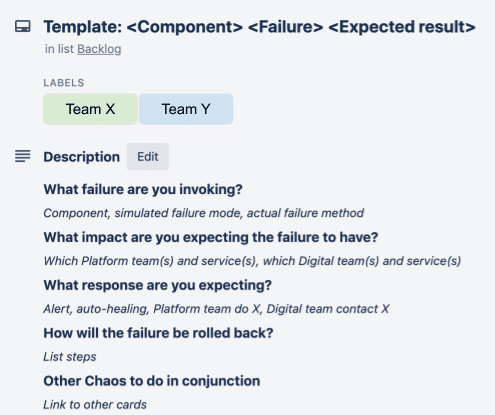
We often use Trello as a collaboration tool for Chaos Days, with each card representing a single experiment. Our template card uses the format:
- Experiment title: <Component> <Failure> <Expected result>
E.g. Third-party service Y being unavailable leads to our service X queuing and retrying requests - What failure are you invoking?
E.g. Response time for requests from service X to Y starts exceeding 10 seconds. Simulate by stopping service Y.
- Expected impact
E.g. This should have no visible client impact for N minutes, during which service X will queue and retry requests, whilst giving clients an OK response. After N minutes the response will change to Service not available.
- Expected response
E.g. Queue and retry kicks in, then alerts fire if 10 Service not available responses occur within 60 seconds. The team’s support person will respond to the alert within 15 minutes and use the runbook to investigate connectivity to service Y.
- Rollback steps
E.g. Restart service Y. - Other experiments to run in parallel
E.g. Intermittent failures in the Queuing platform.
Having designed the experiment, the next step is to determine its execution. This requires consideration of:
- How will the system be modified to simulate or cause the failure condition? Will the engineer need to create a script or program to cause the condition? Can this be programmed so the failure can be repeatedly run? Consider if any third-party or cloud-provided chaos engineering tools might help.
- Which environment will the experiment be run in?
- What load does the system need to be under to trigger the failure and make it observable?
- For the host environment, how will the load occur? For example, if the experiment is running in production, will steady-state production load be sufficient, or does additional synthetic load need injecting? If a pre-production environment is used, how would a production load be simulated?
- When the failure occurs in the given environment, will configured alerts automatically fire at the error level generated by the induced load, or will the alert threshold need temporarily adjusting?
When designing experiments, be mindful of the probe effect (see also Chaos Engineering p224); the means of injecting the failure condition might alter the system in such a way as to cause alternative or unrealistic chaos, thus distorting the experiment.
When to run a Chaos Day
To identify the best time to run your Chaos Day, you should first decide whether the experiments should occur on a single day or be spread over a few days:
- Opting for a single Chaos Day results in a more intensive but shorter event, for both Agents of Chaos and those responding to the chaos. While this approach adds stress, our experience is that the intensity also improves team dynamics and leads to a more memorable event that the team will talk about for years to come. On the downside, it can be harder to maintain the element of surprise, especially if experiments are being run in a pre-production environment. Teams need to be informed to treat failures in this environment as though production were on fire, so it’s likely they’ll be paying close attention to that environment during that time. Plus, once the first experiment is over, the team is likely to realise Chaos Day is upon them!
- Spreading the chaos over a few days allows more of the team to be involved in brainstorming experiments, but still maintains an element of surprise because they won’t know exactly when experiments will be run during the chosen period. It’s unlikely they will remain hypervigilant for the whole of the period, so when failures do occur there will be an element of surprise. Spreading the experiments out allows adjustments to be made to each experiment over the period because lessons from earlier experiments can be used to improve the execution of later ones.
- If this is your first Chaos Day, we recommend starting small and learning the ropes by just running a few experiments on a single day.
The next step is to fix a date for the experiments. This should be at least a couple of weeks after the planning session to allow engineering time to design, implement and test the experiments.
Check if other teams have any key dependencies on the target environment and services over the Chaos Day, to avoid impacting them should the failures ripple out too far and for too long!
Once a date has been agreed, inform the participating teams and reiterate that:
- Supporting teams should treat this as a regular day, and keep busy doing regular work, not watching and waiting for the chaos to unfold.
- If an issue is observed in the target environment during that period, it should be treated as though it were a production issue. Agree on what communication channel should be used for incident response, though, as you may want to keep your production channel clear in case real production incidents occur at the same time!
Finally, book a physical or virtual space so that the Agents of Chaos can collaborate more effectively on the experiments. They should also have their own private communication channel (e.g. a Slack private channel), ideally set up as soon as the group’s members have been identified.
Where to run a Chaos Day
It doesn’t have to be production
Chaos Engineering was made famous by Netflix running their Chaos Monkey in production. However, as Norah Jones writes in her excellent Chaos Engineering Traps post, the Netflix team learned a lot about resilience just by automating their experiments, before they were even run in production!
Because Chaos Engineering is highly contextual, what is right for one organisation may not be appropriate for another. If your pre-production environment is a close enough replica of production (e.g. same architecture, characteristics and supporting structures, such as service configuration, deployment, telemetry, etc.) then running experiments in pre-production will provide valuable lessons, without the costs and risks of targeting production.
Your production environment will always be the most realistic environment to run experiments in, so always consider first how experiments could be run there without impacting users or the business. Various techniques make this possible, including:
- Shadow running production traffic in isolated production instances – production requests are replicated as early as possible and replicated traffic is directed down a set of production service instances that are reserved for experimentation.
- Blue-green deployments or canary releases – experiments are deployed to a small percentage of your production estate, which receives a small amount of production traffic, thus controlling the proportion of sessions impacted if experiments get out of control.
- Flying below the error threshold radar – (in combination with blue-green deployments) most complex environments have a low-level, steady-state error rate. This allows experiments to be safely run providing they don’t elevate the error rate above an impactful threshold. This requires close monitoring of the steady-state error level and any delta introduced by an experiment, plus the ability to quickly disable an experiment before the threshold is exceeded.
- Friendly beta users – if production traffic can be segregated by user, and you have access to a set of users willing to participate in experiments, then beta user traffic could be directed to production instances that are reserved for experimentation.
Environmental considerations
Some of the Chaos Days we have run have multiple pre-production environments to choose from, alongside the production environment. When choosing which pre-production environment to use, consider:
- Likeness to production – how different to production is the environment’s architecture and configuration (e.g. instance size/compute power), connectivity (e.g. which services are present and operational, which are stubbed or connected to external dependencies), supporting structures such as deployment mechanisms, telemetry and alerting configuration? Even if your pre-production is technically identical to production, there may still be differences in how teams interact or treat that environment. For example, alerts may not follow the same process as for Production, alerts may be ignored in pre-production environments due to existing high signal-to-noise.
- Load generation – failures are only observable when triggered by a stimulus, normally in the form of simulated user traffic. Environments that already have load tests running against them can often be easier to experiment on.
- Telemetry – because pre-production environments normally receive less traffic than production, and are often used for testing, their logging, monitoring and alerting services may require configuration changes (e.g. turn on alerts, set error threshold lower) before (and after) Chaos Day in order for failures to show up during the event.
- Business impact – what is the impact on other teams that use this environment? Do they need it to be fully functional in order to deliver a time-critical capability? If experiments get out of control and cause more chaos than intended, how quickly could normal service be resumed?
- Communication channels – how do teams normally collaborate when an issue occurs in production? Is there a similar setup for the pre-production environment? Aim to standardise as much as possible across environments, so that Chaos Day participants strengthen their muscle memory for how to respond during a real production incident.
How a Chaos Day unfolds
As with any team activity, having a single person be the nominated facilitator/lead will make the Chaos Day or Week run more smoothly. Ideally, this should be someone who has been involved in the meetings leading up to this point, but not one of the Agents of Chaos as they’ll likely focus on individual experiments.
At the start of the Chaos Day / Week, the facilitator should remind all participants:
- Which environment is being targeted.
- To treat failures observed in that environment as though Production was on fire (e.g. use standard incident response procedures).
- Which communication channel to use to report and collaborate on failures (we recommend using whatever channel you normally use for issues in a given environment).
Once the Agents of Chaos start running the experiments, the facilitator should help them:
- Document what they’re doing, in a similar manner to documenting a production incident. Knowing who did what, when and why provides more data to harvest during the Chaos Day retrospectives.
- Ensure that not too many experiments are run in parallel and know when to stop, ramp down or ramp up experiments. Keep an eye on how service teams are responding to the experiments, in case they are being overwhelmed by incidents. We’ve found that using a simple Kanban board (e.g. Trello) to show which experiments are in progress can be helpful to visualise what’s in progress, still to do, done, and so on.
- Draw the experiments to a close and return the environment to its normal state. Don’t leave this too late in the day/week, because some failures can be harder to roll back than first thought. Remember to restore any logging and/or alerting configuration changes. Let participants know when the chaos event is over, so they can respond appropriately should an incident occur in the target environment.
- Kick off the retrospective process
Learning from a Chaos Day
Insights that help improve resilience are generated at every step of a Chaos Day, from sketching the system architecture at the beginning to responding to simulated failures on the day itself.
As with real production incidents, further lessons can be extracted by holding post-mortem style retrospectives after the event, to analyse what happened. Some great resources on running incident reviews include:
If several teams were involved in the Chaos Day, ask each team to run their own Chaos retrospective, then feed their top insights into a team-of-teams retrospective.
Chaos retrospective format
Supporting a production service is a team sport, so ideally involve the whole team in the Chaos retrospective, not just the Agents of Chaos and responders. Split the time into sections, or even separate meetings, focusing on:
- What was learnt from the experiments?
Use your standard incident review process, remembering to focus on surfacing new knowledge about system behaviour rather than generating a long list of improvement tasks. If ideas for improvement do come up, note them and assign an owner to review them later (see item 3). Don’t get drawn into solutionising, because that needs a separate thinking space, and will take valuable time away from documenting what was learnt. - What would improve the next Chaos Day?
Spend the last 10 minutes of the meeting on this, noting down for future reference what changes would make the next Chaos Day even more successful. - Team backlog
What improvement considerations/ideas should progress onto a team’s backlog?
Sharing the knowledge
Chaos Days surface a lot of knowledge that can help teams improve service resilience. To get further benefit, share this knowledge across the organisation, making it easy for other teams to find and consume. Consider writing publicly about what you’ve done and learnt – chaos engineering is still in its infancy in the software engineering discipline and making experience reports public will help this important practice mature.
Case study: John Lewis & Partners

Using Chaos Days to improve the John Lewis & Partners Digital Platform
John Lewis & Partners has 25 product teams, building 40 services on their digital platform, which is built and run by two platform teams. There are around 100 microservices, internal and external components, and downstream dependencies. As Digital Platform Enablement Lead, one of my goals was to help product teams to deliver more resilient systems. Running a Chaos Day is a great way to foster an effective incident response, so I brought Lyndsay in to guide us through our first foray.
We used a regular, cross-team, community session to introduce chaos engineering and talk about our experience of running Chaos Days in the public sector. This created an appetite within teams to learn more. For the inaugural Chaos Day, we had just one platform and one product team. It was a big success and the teams learned many lessons about their own systems plus chaos engineering itself. Participants shared these lessons with other teams using their standard post-incident review process, followed by a presentation of key outcomes at their next cross-team community session.
Starting small helped John Lewis & Partners learn and develop a repeatable, scalable approach that they are now replicating out to many more teams.
Next steps
We hope this playbook has been useful to you and inspired you to take the next step in your Chaos Engineering journey. Depending on your context, you might:
- Focus on improving how you respond to and learn from production incidents (free Chaos Days!)
- Run some Chaos experiments for the next architectural change you introduce.
- Run a Chaos Day for a single team.
- Run a Chaos Day for multiple teams.
At Equal Experts we are always happy to have a no-strings-attached conversation about how you can get started in this exciting and beneficial area, so please get in touch!
Complementary approaches
Chaos Days are one of many tools for improving system resilience. Others include:
AWS Game Days
AWS runs Game Days to teach design and diagnosis techniques for improving resilience using an AWS-based fake production service. They are intense and great fun but don’t teach you anything about your own system.
Per feature chaos testing
When a team builds a new feature, they run manual or automated experiments to explore the feature’s impact on system resilience as part of its testing. This can be a good way to introduce chaos-engineering principles, as well as help teams shift-left operability thinking (i.e, consider it earlier in the engineering process, instead of when the first product issue hits).
Purple team security exercises
These exercises help to identify vulnerabilities and weaknesses in a product by simulating the behaviours and techniques of malicious attackers in the most realistic way possible.
Automated failure injection
Tools such as AWS’s Fault Injection Simulator, Gremlin and Netflix’s Chaos Monkey can be used to inject regular but random failures to test the system response on an ongoing basis.
Production incidents
Treat production incidents as learning opportunities, or in the words of John Allspaw, “Incidents are unplanned investments”. If managed well (see Google’s SRE book and Etsy’s debriefing guide), then valuable, firsthand insights can be gained due to everything about the chaos being real! Live issues can be costly to the business. Therefore, it is beneficial to extract as much business value from them as possible, which can be achieved through a better understanding of the system and possible resilience improvements.
Contributors
This playbook is produced through the efforts of a number of people, all of whom have generously shared their experiences for the benefit of others.
This playbook was produced by a number of people within the Equal Experts network, including:
How to contribute
Guides like this are never complete. There will always be improvements we can make and as more teams use these practices in a wider variety of contexts – some of which we may not have envisioned. To help ensure this playbook remains relevant and useful, we welcome contributions from anyone in the wider software engineering community.
From fixing a typo to suggesting entirely new content, all suggestions are welcome. Please contact us if you would like to contribute to the Chaos Day Playbook.
License
This is a human-readable summary of (and not a substitute for) the licence.
You are free to:
- Share — copy and redistribute the material in any medium or format
- Adapt — remix, transform, and build upon the material
The licensor cannot revoke these freedoms as long as you follow the licence terms.
Under the following terms:
- Attribution — You must give appropriate credit, provide a link to the licence, and indicate if changes were made. You may do so in any reasonable manner, but not in any way that suggests the licensor endorses you or your use.
- NonCommercial — You may not use the material for commercial purposes.
- ShareAlike — If you remix, transform, or build upon the material, you must distribute your contributions under the same licence as the original.
- No additional restrictions — You may not apply legal terms or technological measures that legally restrict others from doing anything the licence permits.
Notices:
- You do not have to comply with the licence for elements of the material in the public domain or where your use is permitted by an applicable exception or limitation.
- No warranties are given. The licence may not give you all of the permissions necessary for your intended use. For example, other rights such as publicity, privacy, or moral rights may limit how you use the material.